How to Spot a Phishing Email
Phishing emails are designed to make you act before you have time to think.
They may claim that your account has been locked, a payment failed, a package could not be delivered, or someone accessed your account. Others promise refunds, prizes, job opportunities, or unexpected payments.
The goal is usually to convince you to click a link, open an attachment, share sensitive information, or send money.
Some phishing emails are easy to recognize because they contain obvious spelling mistakes or strange requests. Others closely copy the branding, language, and design of real companies.
Learning to notice small warning signs can help you avoid giving attackers access to your accounts, money, or personal information.
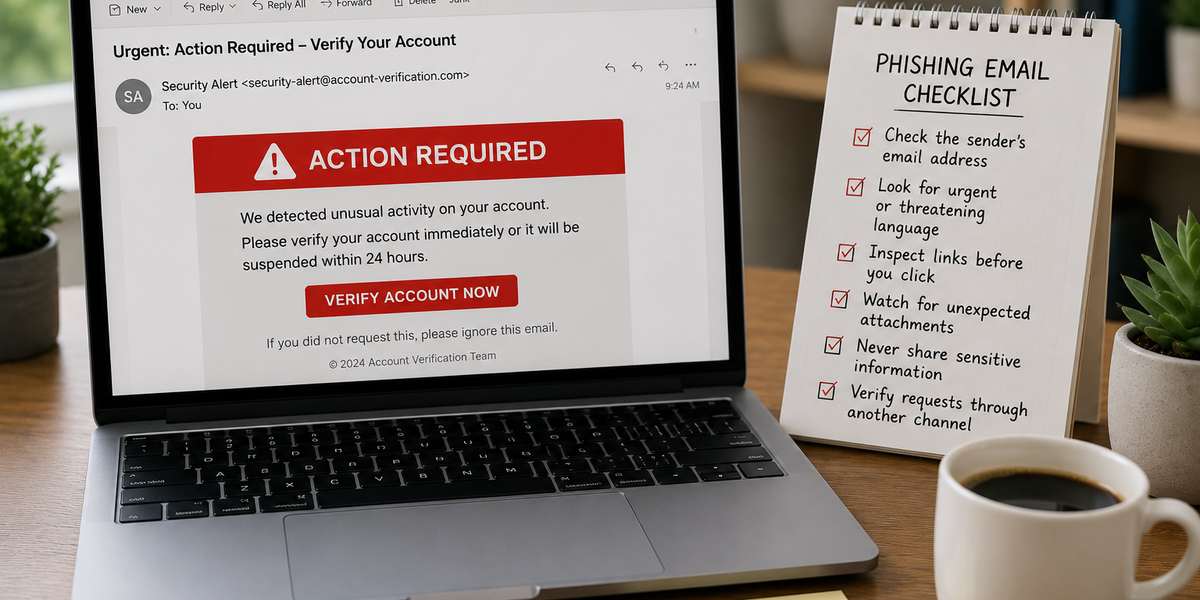
Check the Sender’s Full Email Address
A familiar display name does not prove that an email is genuine.
An attacker can make the sender’s name appear as “Your Bank,” “Customer Support,” or even the name of someone you know.
Check the full email address.
A message may appear to come from a trusted company while using an unrelated address, a free email account, or a domain with a small spelling change.
For example, an attacker might replace a letter, add an extra word, or use a different ending.
Instead of:
support@company.com
the address might look like:
support@company-security.com
or:
support@cornpany.com
The second example uses letters that may look similar at a quick glance.
However, a correct-looking address does not guarantee safety. Sender information can sometimes be manipulated, so consider the entire message.
Be Careful With Urgent Language
Phishing emails often create fear or pressure.
Common warnings include:
- “Your account will be closed today.”
- “Payment required immediately.”
- “Suspicious activity detected.”
- “Your password expires in one hour.”
- “Confirm your identity now.”
- “Final warning.”
Urgency encourages people to act quickly without checking whether the request is legitimate.
Real companies may send time-sensitive messages, but you should still verify them independently.
Instead of clicking the email link, open the company’s official app or type the website address into your browser yourself.
If there is a genuine account problem, you will often see a notification after signing in.
Look Closely at Links
A link can display one address while sending you somewhere else.
On a computer, you can usually move your cursor over a link without clicking. The actual destination may appear near the bottom of the browser or email window.
On a phone, pressing and holding the link may show a preview. Be careful not to open it accidentally.
Look for:
- Misspelled company names
- Extra words or characters
- Unfamiliar domains
- Strange combinations of letters and numbers
- Unexpected shortened links
Pay attention to the main domain name.
A link such as:
belongs to example.com, not necessarily to the bank named at the beginning.
If you are uncertain, do not use the link. Open the official website or app separately.
Watch for Unexpected Attachments
Attachments can contain malicious software or direct you to fake login pages.
Be cautious with unexpected files, especially when the message creates urgency or asks you to enable additional features.
Suspicious attachments may be presented as:
- Invoices
- Delivery notices
- Receipts
- Legal documents
- Resumes
- Payment confirmations
- Security alerts
Even common file types can be dangerous in certain circumstances.
Do not open an attachment simply because it appears to come from someone you know. Email accounts can be compromised.
If the message is unusual, contact the sender through another method and ask whether they sent the file.
Notice Requests for Sensitive Information
Legitimate organizations generally do not ask you to send passwords, full payment details, authentication codes, or other highly sensitive information through email.
Be suspicious if a message requests:
- Your password
- A one-time login code
- Credit card information
- Bank account details
- Government identification numbers
- Recovery codes
- Copies of identity documents
One-time authentication codes are especially important.
An attacker may already have your password and need only the temporary code to access your account. Never share a login code unless you understand exactly why it was requested and where it is being entered.
Look for Unusual Payment Requests
Some phishing emails impersonate managers, colleagues, suppliers, friends, or family members.
The sender may request an urgent payment, gift cards, cryptocurrency, or a change to bank account details.
For example, an email may claim:
“I am in a meeting and need you to purchase gift cards immediately.”
Or:
“Our bank details have changed. Please send future payments to this new account.”
Treat unexpected financial changes carefully, even when the email appears genuine.
Verify the request using a trusted phone number or another established communication method. Do not rely only on contact details included in the suspicious email.
Do Not Trust Branding Alone
Phishing emails can include real company logos, professional designs, familiar colors, legal notices, and realistic email signatures.
Attackers can copy public information from company websites and social media profiles.
A polished email is not automatically legitimate.
Instead of judging the appearance, check the sender, links, request, timing, and context.
Ask whether the company normally communicates this way and whether the message matches your recent activity.
Pay Attention to Unusual Language
Spelling mistakes and poor grammar can be warning signs, but many modern phishing emails are well written.
Look for language that feels unusual for the sender.
A colleague may suddenly use a very formal tone. A company may address you as “Dear Customer” even though it normally uses your name.
The message may include strange formatting, unusual greetings, unexpected instructions, or wording that does not match previous emails.
No single writing mistake proves that an email is fraudulent. Treat it as one clue among several.
Be Suspicious of Unexpected Good News
Phishing does not always rely on fear.
Some messages promise:
- Lottery winnings
- Refunds
- Free products
- Investment opportunities
- High-paying jobs
- Government payments
- Large inheritances
The email may ask you to pay a fee, provide personal information, or sign in through a link before receiving the reward.
If you did not enter a competition or apply for an opportunity, question why you were contacted.
Offers that appear unusually generous may be designed to collect information or money.
Verify Requests Through Another Channel
If an email seems suspicious but could be legitimate, verify it independently.
You can:
- Open the company’s official app
- Type the website address yourself
- Call a verified phone number
- Contact the sender through a separate messaging service
- Ask your workplace IT or security team
Do not use the phone number or contact information provided in the suspicious message unless you can confirm it elsewhere.
Independent verification is especially important for payments, password resets, account changes, and requests involving confidential information.
What to Do If You Clicked a Phishing Link
Clicking a suspicious link does not always mean your account has been compromised.
The next steps depend on what happened.
If you entered a password, change it immediately through the official website or app. If you use the same password elsewhere, change those accounts as well.
Enable multi-factor authentication if it is available.
If you entered payment information, contact your bank or card provider and explain what happened.
If you downloaded or opened a suspicious file, disconnect from sensitive work systems if appropriate and run a security scan. On a work device, contact your IT or security team.
Review your accounts for unfamiliar activity and watch for unexpected login notifications.
Acting quickly can reduce the potential damage.
A Useful Habit Before You Click
Before opening a link or attachment, ask:
Was I expecting this message?
Then check:
Does the sender address match?
Is the email pressuring me to act immediately?
Is it asking for information or behavior that seems unusual?
If something feels wrong, verify the message independently.
Phishing succeeds when people react quickly. A few extra seconds spent checking the sender, link, and request can prevent a much larger problem.