How to Use AI to Save 5 Hours a Week
Most people do not lose five hours a week to one major task. The time disappears in smaller pieces: rewriting emails, summarizing meetings, searching through documents, organizing notes, preparing reports, formatting information, and repeating work they have already done before.
AI can reduce some of that workload, but only when it is used for the right tasks.
The goal is not to automate everything or remove people from important decisions. It is to spend less time on repetitive work so you have more time for tasks that require judgment, creativity, relationships, and experience.
Saving five hours a week means finding roughly one hour each workday. For many people, that can come from improving several small workflows rather than making one dramatic change.
Start With a One-Week Time Audit
Before using AI, identify where your time is actually going.
For one week, write down repetitive tasks that take at least ten or fifteen minutes.
Look for work such as:
- Writing similar emails
- Summarizing meetings
- Turning notes into reports
- Searching for information
- Reformatting documents
- Creating first drafts
- Organizing task lists
- Preparing recurring updates
- Reviewing long documents
At the end of the week, identify tasks that happen repeatedly and follow a similar process.
These are often the best opportunities for AI support.
Do not begin with your most sensitive or complicated responsibility. Start with low-risk work that is easy to review.
Save Time on Email
Email is one of the easiest places to recover time.
AI can help draft replies, shorten long messages, improve tone, and turn rough notes into clear communication.
Instead of spending fifteen minutes rewriting an email, provide the main points:
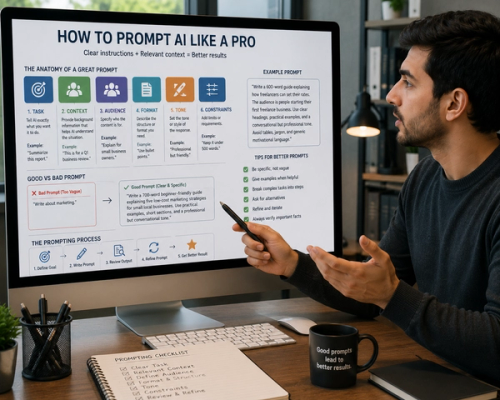
“Write a friendly but professional reply. Thank them for the update, confirm that Thursday works, and ask them to send the final agenda before the meeting. Keep it under 120 words.”
You can also ask AI to revise an existing draft:
“Make this clearer and more natural. Keep the meaning unchanged and avoid overly formal language.”
The draft should still be reviewed before sending, especially when it involves commitments, deadlines, money, legal matters, or sensitive information.
Saving ten minutes on three emails each day can recover more than two hours over a workweek.
Turn Meeting Notes Into Useful Documents
Meeting follow-up often takes longer than the meeting itself.
AI can turn rough notes into:
- Meeting summaries
- Action items
- Decision logs
- Follow-up emails
- Project updates
A useful prompt might be:
“Organize these notes into three sections: decisions, action items, and unresolved questions. Include an owner and deadline only when they are clearly mentioned. Do not invent missing information.”
This can reduce the time spent cleaning up notes and help prevent important tasks from being forgotten.
Review names, dates, responsibilities, and decisions before sharing the summary.
Summarize Long Documents
AI can help identify the main information in reports, articles, policies, contracts, research papers, and internal documents.
Instead of asking only for a general summary, explain what you need.
For example:
“Summarize this report for a project manager. Focus on deadlines, budget changes, risks, and decisions that require approval.”
Or:
“Identify the five recommendations that would have the greatest effect on small businesses.”
A focused summary is usually more useful than a shorter version of every section.
For important legal, financial, medical, or policy documents, use the summary as a guide—not a replacement for reading the original material.
Create First Drafts Faster
Starting from a blank page can consume more time than editing.
AI can create a first draft of:
- Reports
- Proposals
- Presentations
- Articles
- Job descriptions
- Project plans
- Social media posts
- Internal announcements
Provide enough context to make the draft useful.
For example:
“Write a 600-word project update for a donor. The audience already understands the project. Cover completed activities, current work, challenges, and next steps. Use full paragraphs and a professional tone. Do not add information beyond the notes provided.”
The first version does not need to be perfect. Its purpose is to give you something to review, correct, and improve.
AI is most useful when it reduces drafting time without removing human judgment.
Reuse Work You Have Already Done
Many people recreate similar documents from the beginning.
If you regularly write reports, meeting agendas, client proposals, or project updates, create reusable templates.
You can give AI a previous example and ask it to follow the same structure:
“Use this report as a formatting and tone reference. Create a new version using the updated information below. Keep all figures and dates exactly as provided.”
This can improve consistency and reduce repeated formatting work.
Remove confidential information before sharing examples with tools that are not approved for sensitive data.
Use AI to Organize Your Day
A long task list does not always show what should happen first.
AI can help group tasks by urgency, effort, deadline, or type of work.
For example:
“Organize these tasks into a realistic eight-hour workday. Prioritize deadlines, group similar tasks, and include two short breaks. Do not schedule more than 90 minutes of focused work without a break.”
You can also ask it to identify tasks that could be delegated, postponed, automated, or removed.
The schedule still needs your judgment. AI may not understand workplace politics, personal energy, hidden dependencies, or changing priorities.
Improve Research Without Replacing Verification
AI can help you begin research by explaining unfamiliar topics, generating search terms, comparing concepts, or organizing information.
For example:
“I am researching employee retention in small technology companies. Suggest ten focused research questions and group them by compensation, management, career development, and workplace culture.”
This can reduce the time spent deciding where to begin.
However, AI may provide outdated or incorrect information. Verify important claims using reliable sources, especially when the work will be published or used for major decisions.
Automate Repetitive Formatting
Small formatting tasks can consume more time than expected.
AI can help:
- Convert notes into full paragraphs
- Turn paragraphs into bullet points
- Reorganize information by category
- Standardize headings
- Shorten repeated text
- Rewrite content for different audiences
For example:
“Convert these notes into a weekly update. Use one short paragraph for completed work, one for current priorities, and one for risks.”
Clear instructions reduce the amount of editing needed afterward.
Build a Small Prompt Library
If a prompt works well, save it.
Create a document with prompts for tasks you repeat, such as:
- Email replies
- Meeting summaries
- Weekly reports
- Article reviews
- Project updates
- Research summaries
- Social media drafts
A reusable prompt might be:
“Review the text below for grammar, clarity, repetition, and unnatural wording. Keep the original meaning and tone. Do not add new claims.”
Over time, a small collection of reliable prompts can save more time than writing new instructions for every task.
Keep People Responsible for Important Decisions
AI can organize information and suggest options, but it should not automatically make decisions involving people, money, rights, safety, or major business consequences.
Use it to prepare information, not to avoid responsibility.
For example, AI can summarize job applications, but a person should review the original materials and make the hiring decision.
It can identify patterns in customer feedback, but a manager should decide which changes to make.
Efficiency matters, but accuracy, fairness, privacy, and accountability matter too.
Protect Sensitive Information
Do not paste confidential information into an AI tool without understanding how the service handles data.
Be careful with:
- Customer information
- Employee records
- Passwords
- Financial details
- Medical information
- Private contracts
- Unreleased business plans
Use company-approved tools and follow workplace policies.
When possible, remove names, account numbers, identifying details, and other sensitive information before asking for help.
A Realistic Five-Hour Weekly Target
Five hours can come from several small improvements:
- Two hours saved drafting and revising emails
- One hour saved summarizing meetings
- One hour saved creating first drafts
- Thirty minutes saved organizing tasks
- Thirty minutes saved formatting recurring documents
The exact combination will depend on your work.
Track the time for two weeks. If an AI-assisted task takes longer because the output requires extensive correction, the workflow needs a better prompt—or may not be a good use of AI.
The best uses of AI are usually repetitive, time-consuming, easy to review, and low risk.
You do not need to automate your entire job to save five hours a week. Start with one recurring task, improve the process, save the prompt, and move to the next.
Small improvements repeated every workday can create more time than one complicated automation that is difficult to maintain.