How to Prompt AI Like a Pro
Using AI well is less about knowing secret commands and more about communicating clearly.
A vague prompt may produce a generic answer. A detailed prompt gives the AI enough context to understand what you need, who the result is for, and what a useful response should look like.
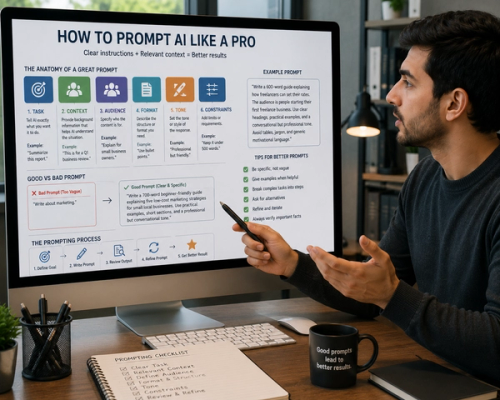
Compare these two requests:
“Write about marketing.”
“Write a 700-word beginner-friendly guide explaining five low-cost marketing strategies for small local businesses. Use practical examples, short sections, and a professional but conversational tone.”
The second prompt is more likely to produce a useful result because it defines the topic, audience, length, structure, and style.
Good prompting is not about making every request long. It is about including the details that affect the answer.
Start With a Clear Task
Tell the AI exactly what you want it to do.
Use direct instructions such as:
- Explain
- Summarize
- Compare
- Rewrite
- Analyze
- Brainstorm
- Create
- Review
- Translate
- Organize
Instead of writing:
“Remote work.”
Try:
“Explain the main benefits and challenges of remote work for small businesses.”
A clear action reduces guesswork.
If the task includes several parts, list them in the order you want them completed.
For example:
“Summarize this report, identify the three main risks, and suggest practical next steps.”
Provide Relevant Context
AI cannot automatically know the background behind your request.
Include information that may change the answer.
Suppose you ask:
“Create a marketing plan.”
The AI does not know what you sell, who your customers are, how much you can spend, or what you want to achieve.
A stronger prompt would be:
“Create a three-month marketing plan for a new bakery in a small city. The target customers are young professionals and families. The monthly marketing budget is $500, and the main goal is to increase local awareness and in-store visits.”
Context helps the response fit your actual situation.
You do not need to include every detail. Focus on information that affects the result.
Define the Audience
The same topic should be explained differently depending on who will read it.
An explanation for a child will use different language than a report for engineers or business executives.
Tell the AI who the content is for.
For example:
“Explain cybersecurity to small-business owners with no technical background.”
Or:
“Rewrite this presentation for senior financial executives who already understand the basics.”
Defining the audience helps control vocabulary, depth, examples, and tone.
Describe the Desired Format
If you know how you want the answer organized, say so.
You can request:
- Full paragraphs
- Bullet points
- A checklist
- A step-by-step guide
- A comparison
- A table
- An email
- A report
- A presentation outline
- Frequently asked questions
For example:
“Create a step-by-step checklist for launching an online store. Organize the tasks by planning, setup, launch, and post-launch.”
Clear formatting instructions can save time because you are less likely to need major revisions.
However, avoid requesting a table simply because the information involves comparison. Tables are useful for quick reference but may not be the best choice for detailed explanations.
Set the Tone
Tone affects how the response feels.
You might request writing that is:
- Professional
- Friendly
- Conversational
- Formal
- Persuasive
- Reassuring
- Direct
- Educational
Instead of saying:
“Make it sound better,”
try:
“Rewrite this in a warm, professional tone. Keep it natural and avoid overly formal language.”
You can also explain what to avoid:
“Do not use corporate jargon, exaggerated claims, or language that sounds like an advertisement.”
Specific instructions are more useful than broad requests.
Include Length and Level of Detail
Tell the AI how detailed the response should be.
You might request:
“Explain this in three short paragraphs.”
Or:
“Write a detailed guide of approximately 1,000 words.”
You can also define the level:
“Explain this for a complete beginner.”
“Assume the reader already understands basic accounting.”
Without these instructions, the response may be much shorter, longer, simpler, or more technical than expected.
Provide Examples When Style Matters
Examples can be useful when you want a specific writing style or structure.
You might say:
“Use this paragraph as a style reference. Match its clear, conversational tone, but do not copy the wording.”
Examples show the AI what you mean more clearly than descriptions such as “make it engaging.”
You can provide:
- A previous article
- A sample email
- A brand voice guide
- A preferred introduction
- A formatting example
The example does not need to be long. A short sample may be enough to establish the direction.
Add Constraints
Constraints define boundaries for the response.
For example:
“Write a 600-word article. Use no more than five headings. Avoid tables, clichés, and repetitive conclusions.”
Or:
“Create ten business name ideas. Each name should contain no more than two words and should not include the words digital, solutions, or global.”
Useful constraints may include:
- Word count
- Number of sections
- Required topics
- Words to avoid
- Reading level
- Formatting rules
- Geographic focus
- Time period
Too many restrictions can make the response unnatural, so include only the ones that matter.
Ask the AI to Use Your Information
If you provide notes, documents, data, or source material, explain how the AI should use them.
For example:
“Use only the information in the text below. Summarize the findings without adding outside claims.”
Or:
“Turn these meeting notes into a professional project update. Keep all dates and figures unchanged.”
This reduces the chance that the AI will introduce unsupported details.
When accuracy matters, ask it to separate confirmed information from assumptions.
Break Complex Tasks Into Stages
Large requests often improve when divided into smaller steps.
Instead of asking the AI to create an entire business strategy immediately, you might begin with:
“Identify the target audience and the three main customer problems.”
Then continue with:
“Based on that analysis, create a marketing strategy.”
Finally:
“Turn the strategy into a 90-day action plan.”
Working in stages gives you a chance to review the direction before the AI builds on it.
It also makes errors easier to notice.
Ask for Alternatives
The first answer is not always the best answer.
Request several options when creativity or judgment is involved.
For example:
“Write three versions of this email: one formal, one friendly, and one brief.”
Or:
“Suggest five headlines. Avoid clickbait and keep each one under ten words.”
Alternatives make it easier to compare approaches and combine the strongest ideas.
Refine Instead of Starting Over
Prompting is often a conversation.
If the first response is close but not quite right, explain what needs to change.
You might say:
- “Make the introduction shorter.”
- “Use simpler language.”
- “Add a practical example.”
- “Remove repetitive sections.”
- “Make it sound less formal.”
- “Focus more on small businesses.”
- “Rewrite this in full paragraphs instead of short sentences.”
Specific feedback works better than saying, “I do not like it.”
Explain what feels wrong and what you want instead.
Ask AI to Check Its Work
For important tasks, add a review step.
You can ask:
“Review the draft for unclear wording, repetition, unsupported claims, and factual inconsistencies.”
For calculations:
“Show the steps and check the result.”
For a report:
“Identify any claims that need a source.”
AI can still miss errors, so this should not replace human review. However, it can help catch obvious problems.
Do Not Assume Confident Means Correct
AI can produce incorrect information in clear and convincing language.
When facts matter, ask for sources and verify important claims independently.
This is especially important for:
- Medical information
- Legal guidance
- Financial decisions
- Current events
- Statistics
- Academic research
- Technical instructions
You can ask:
“Separate verified facts from assumptions and flag anything that may require confirmation.”
The quality of a response depends not only on the prompt but also on the information available to the AI.
A Simple Prompt Formula
A useful prompt can follow this structure:
Task + Context + Audience + Format + Tone + Constraints
For example:
“Write a 700-word guide explaining how freelancers can set their rates. The audience is people starting their first freelance business. Use clear headings, practical examples, and a conversational but professional tone. Avoid tables, jargon, and generic motivational language.”
Not every prompt needs all six parts.
A simple question may need only a clear task. A complex project may require detailed context and several constraints.
The goal is not to write the longest possible prompt. It is to remove unnecessary ambiguity.
Better prompts usually lead to better first drafts, but prompting is not a one-time test. Give clear instructions, review the result, and refine the parts that need improvement.
The most effective AI users do not search for one perfect phrase. They treat prompting as collaboration: explain the goal, provide useful context, set clear boundaries, and improve the result through specific feedback.