The Difference Between Hardware, Software, and Firmware
Every computer, smartphone, smart television, game console, and connected device depends on three basic components: hardware, software, and firmware.
These terms are often used together, but they describe different parts of how technology works.
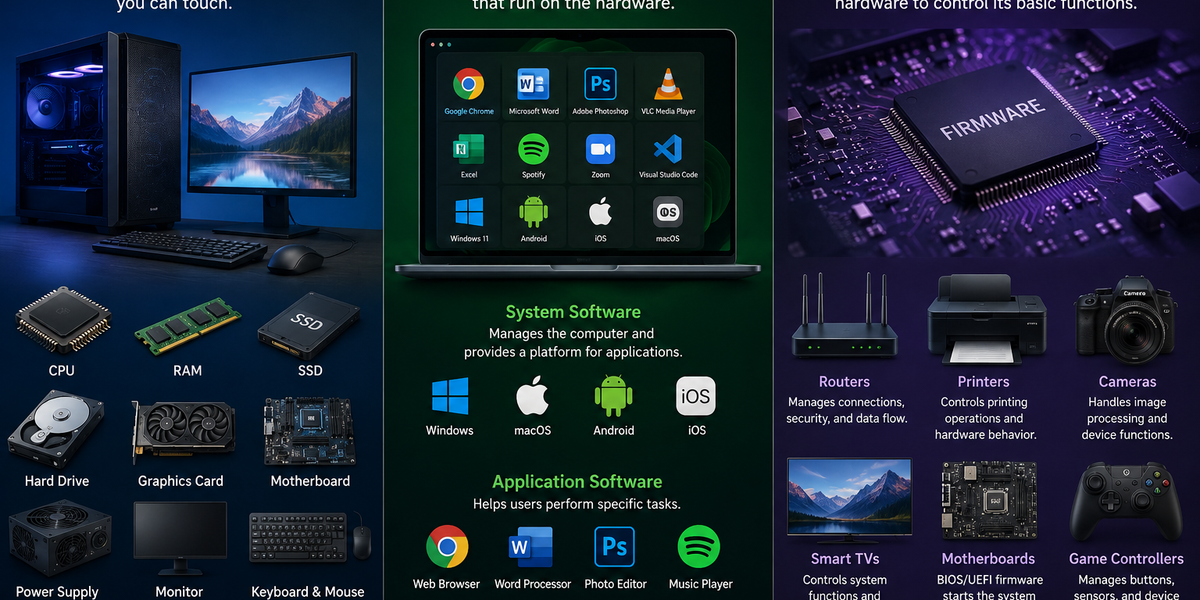
Hardware is the physical equipment you can touch. Software is the collection of programs and instructions you use. Firmware is specialized software built into hardware to help the device operate.
The easiest way to understand the difference is to think about a smartphone. The screen, battery, camera, and processor are hardware. The apps and operating system are software. The built-in instructions that help components such as the camera or touchscreen communicate with the rest of the phone are firmware.
What Is Hardware?
Hardware includes the physical parts of a computer or electronic device.
If you can physically touch a technology component, it is usually hardware.
Examples include:
- Computer monitors
- Keyboards
- Processors
- Memory chips
- Hard drives
- Speakers
- Cameras
- Batteries
- Printers
- Routers
Inside a computer, the central processing unit, or CPU, performs calculations and processes instructions. Random-access memory, or RAM, temporarily holds information that programs need while they are running. A solid-state drive, or SSD, stores files and applications even after the computer is turned off.
Hardware provides the physical ability to perform tasks, but it needs instructions to know what to do.
A laptop without software would contain powerful electronic components but would not provide the familiar tools people use for browsing, writing, communicating, or creating files.
What Is Software?
Software is a collection of digital instructions that tells hardware what to do.
Unlike hardware, software is not a physical object. It consists of programs, data, and code that run on electronic devices.
Examples include:
- Web browsers
- Mobile apps
- Video games
- Word processors
- Photo-editing programs
- Messaging apps
- Operating systems
Software can generally be divided into two broad categories: system software and application software.
System software manages the device and provides the environment in which other programs operate. Operating systems such as Windows, macOS, Android, and iOS are examples.
Application software helps users perform specific tasks. A music app plays audio, a spreadsheet program organizes data, and a messaging app allows people to communicate.
When you open an application, the software sends instructions to the device’s hardware. The processor performs calculations, memory stores temporary information, and the screen displays the results.
What Is Firmware?
Firmware is specialized software stored within a piece of hardware.
Its purpose is to control the device’s basic functions and help the hardware operate correctly.
Firmware is commonly found in:
- Routers
- Printers
- Cameras
- Smart televisions
- Computer motherboards
- Game controllers
- Headphones
- Home appliances
- Cars
For example, a wireless router uses firmware to manage network connections, security settings, and communication between devices.
A digital camera may use firmware to control how it captures images, processes colors, manages buttons, and saves photos.
Firmware usually works in the background. Most users interact with it far less often than they interact with regular software.
Why Is Firmware Different From Regular Software?
Firmware is software, but it has a more specialized role.
Regular software is usually designed for users to open, close, install, update, or remove. You can download a new app, uninstall a game, or switch to a different web browser.
Firmware is more closely connected to the hardware it controls. It is often stored on a memory chip inside the device and begins working when the device is turned on.
You may never see the firmware directly, but the hardware may not function properly without it.
For example, a printer’s firmware helps interpret printing instructions, control internal components, and manage communication with a computer. The document-editing program you use to create a file is regular software.
How Hardware, Software, and Firmware Work Together
Imagine taking a photo with a smartphone.
The camera lens, image sensor, processor, storage, and screen are hardware.
The camera app is software. It provides controls that allow you to take photos, select settings, and view images.
The camera component’s firmware helps control lower-level functions and communication between the hardware and the phone’s operating system.
When you tap the camera button, the software sends instructions. The firmware helps translate and manage those instructions, and the hardware captures and processes the image.
All three components work together to complete a task that appears almost instant to the user.
Can Hardware Work Without Software?
Most modern hardware has limited usefulness without software.
A keyboard can send electrical signals, but software is needed to interpret those signals and display letters on a screen.
A processor can perform calculations, but it requires instructions that tell it which calculations to perform.
Some simple devices operate mainly through built-in firmware rather than user-installed software. A basic microwave, for example, may use firmware to manage buttons, cooking times, and power levels.
The more complex a device becomes, the more it depends on different layers of software.
Can Software Work Without Hardware?
Software needs hardware to run.
An application may be stored as code, but it requires a physical processor, memory, storage, and other components to perform its instructions.
Even cloud-based software runs on physical servers located in data centers.
The word “cloud” can make digital services sound as if they exist without physical equipment. In reality, cloud applications depend on large numbers of computers, storage systems, cables, and networking devices.
Can Firmware Be Updated?
Yes. Many manufacturers release firmware updates.
These updates may:
- Fix security vulnerabilities
- Correct technical problems
- Improve performance
- Add compatibility with new devices
- Introduce new features
Updating firmware can be important, especially for internet-connected devices such as routers, security cameras, and smart home equipment.
However, firmware updates should be installed carefully. If an update is interrupted or the wrong firmware is installed, the device may stop functioning correctly.
Use updates from the device manufacturer and follow the provided instructions.
What Is a Driver?
A driver is another type of software that helps an operating system communicate with hardware.
For example, a computer may need a printer driver to understand how to send information to a specific printer.
Drivers are different from firmware because they usually run within the operating system rather than being stored directly inside the hardware.
Firmware controls important functions from within the device, while drivers help the device communicate with the computer or operating system.
Both may be necessary for hardware to work correctly.
A Simple Way to Remember the Difference
Think of a smart washing machine.
The physical machine, motor, buttons, sensors, and display are the hardware.
The mobile application used to control the washing machine is software.
The built-in instructions that control wash cycles, interpret sensor information, and manage the machine’s basic operation are firmware.
Hardware is the equipment.
Software tells the equipment what tasks to perform.
Firmware helps the equipment understand how to operate at a basic level.
Modern technology depends on all three. Hardware provides the physical components, software creates the functions people use, and firmware connects instructions more closely to the device itself.