How the Internet Actually Works (Explained Simply)
The internet feels almost instant. You type a website address, tap a link, or send a message, and the information appears within seconds. Behind that simple action, however, many computers, networks, cables, and systems are working together.
The internet is not one giant computer, and it is not stored in one place. It is a worldwide network of connected devices that communicate using shared rules.
At its simplest, the internet works by breaking information into small pieces, sending those pieces across networks, and putting them back together when they reach their destination.
The Internet Is a Network of Networks
A computer network is a group of devices that can communicate with one another.
Your home Wi-Fi is a small network. It may connect your phone, laptop, television, printer, and other devices. Schools, offices, hospitals, and businesses have their own networks as well.
The internet connects millions of these smaller networks around the world. That is why it is often described as a “network of networks.”
No single company owns the entire internet. Internet service providers, technology companies, governments, universities, data centers, and other organizations operate different parts of the infrastructure.
They agree to use common technical standards so information can move between separate networks.
What Happens When You Visit a Website?
Imagine typing a website address into your browser.
Several things happen almost immediately.
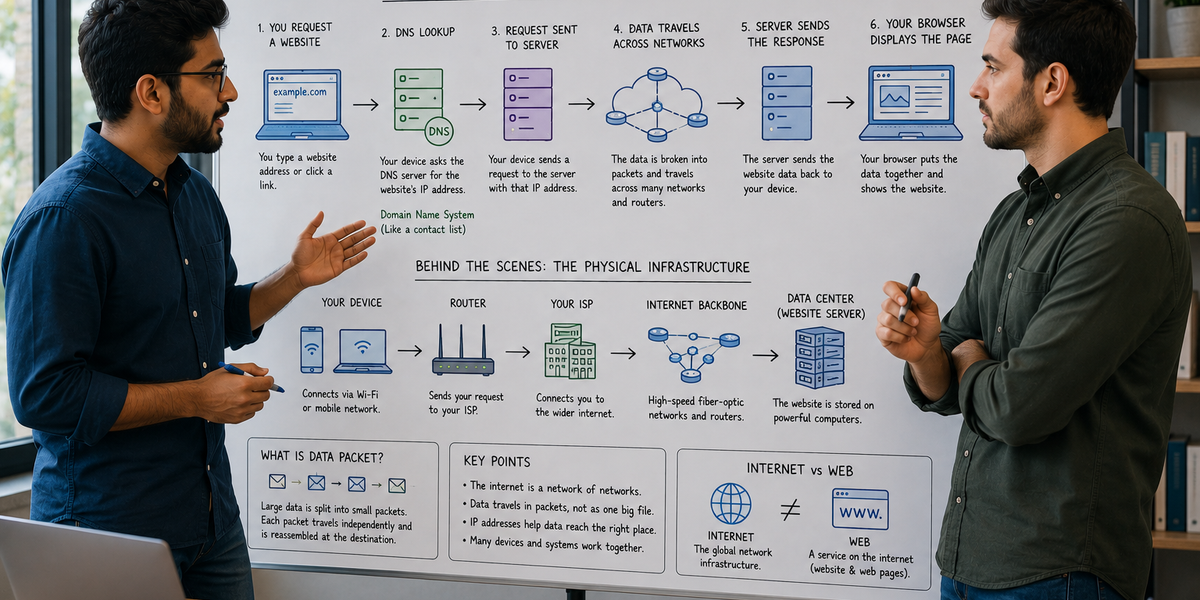
First, your device needs to identify where the website is located. The name you typed is easy for people to remember, but computers use numerical addresses called IP addresses.
Your device asks a system called the Domain Name System, or DNS, to find the IP address connected to the website name.
DNS works somewhat like a contact list. You search for a name, and it provides the information needed to reach the correct destination.
Once the IP address is found, your browser sends a request to the computer hosting the website.
That computer, known as a server, receives the request and sends the website’s information back to your device. Your browser then organizes the information and displays the page.
This process often happens in less than a second.
What Is an IP Address?
Every device connected to the internet needs a way to be identified.
An Internet Protocol address, or IP address, helps networks determine where information should be sent.
It works somewhat like a mailing address. If someone sends a package, the delivery system needs an address to know where it should go. In the same way, internet traffic uses IP addresses to reach the correct device or network.
There are two main versions: IPv4 and IPv6.
IPv4 addresses look something like this:
192.0.2.1
Because the number of internet-connected devices grew rapidly, the available supply of IPv4 addresses became limited. IPv6 was introduced to provide a much larger number of possible addresses.
An IPv6 address is longer and may include both numbers and letters.
Most people do not need to remember IP addresses because domain names and DNS handle that work in the background.
How Information Travels Across the Internet
When you open a website, stream a video, or send a photo, the information usually does not travel as one large file.
Instead, it is divided into smaller pieces called packets.
Each packet contains part of the information along with details about where it came from and where it needs to go.
Routers direct these packets through different networks. A router examines the destination and chooses a path toward it.
Not every packet necessarily follows the same route. One packet may travel through one group of networks while another takes a different path.
When the packets reach your device, they are placed back in the correct order.
This system makes internet communication flexible. If one route is unavailable or congested, traffic may be sent through another route.
The Internet Is Mostly Physical
People often imagine the internet as something floating invisibly in the air. In reality, most internet traffic travels through physical infrastructure.
This includes:
- Fiber-optic cables
- Underground cables
- Undersea cables
- Data centers
- Routers
- Network equipment
- Cell towers
Fiber-optic cables carry information using pulses of light and can transmit large amounts of data very quickly.
Undersea cables connect continents and carry much of the world’s international internet traffic. Satellites are also used, especially in remote areas, but they are not responsible for most global internet communication.
Wi-Fi is only the wireless connection between your device and a nearby router. After reaching the router, the information usually continues through physical cables.
What Does an Internet Service Provider Do?
An internet service provider, or ISP, connects your home or business to the wider internet.
When you open a website, your request usually travels from your device to your router and then through your ISP’s network.
The ISP connects with other networks so your request can reach its destination.
Different providers may use fiber, cable, mobile networks, satellite connections, or other technologies.
Internet speed depends on several factors, including your service plan, connection type, network congestion, Wi-Fi signal, distance from network equipment, and the capacity of the website or service you are using.
What Are Servers?
A server is a computer designed to provide information or services to other computers.
Websites, apps, videos, emails, and online files are stored or processed on servers.
When you open a website, your browser acts as a client. It requests information, and the server responds.
Large online platforms may use thousands of servers located in data centers around the world. These systems help manage large numbers of users and keep services available if individual machines fail.
Some companies also use cloud computing, which provides access to computing power, storage, and software through large networks of remote servers.
How Do Websites Appear in Your Browser?
A website is built using code and digital resources.
When a server responds to your request, it may send several types of information.
HTML provides the structure of the page, such as headings, paragraphs, buttons, and links.
CSS controls much of the appearance, including colors, fonts, spacing, and layout.
JavaScript adds interactive behavior, such as menus, animations, forms, notifications, and automatic updates.
Your browser reads these files and combines them into the page you see.
The website itself is not sent as a screenshot. Your browser receives instructions and builds the page on your device.
What Is the Difference Between the Internet and the Web?
The internet and the World Wide Web are related, but they are not the same thing.
The internet is the global network and infrastructure that connects devices.
The web is one service that operates on the internet. It includes websites and pages accessed through browsers.
Email, online gaming, video calls, messaging apps, and file transfers also use the internet, but they are not necessarily part of the web.
You can think of the internet as the road system and the web as one type of traffic traveling on those roads.
How Does Information Stay Secure?
Many websites use HTTPS to protect information sent between your browser and the website.
The “S” stands for secure.
HTTPS uses encryption, which changes information into a form that is difficult for unauthorized people to read while it is traveling.
When you visit an HTTPS website, your browser and the server establish a secure connection. This helps protect passwords, payment information, messages, and other sensitive data.
However, HTTPS does not guarantee that a website is trustworthy. It protects the connection, but a secure connection can still lead to a fraudulent or harmful website.
Users should still check website addresses carefully and avoid sharing sensitive information with unfamiliar services.
Why Does the Internet Sometimes Feel Slow?
A slow connection can have many causes.
Your Wi-Fi signal may be weak, too many devices may be using the network, or your internet provider may be experiencing congestion.
The website itself may also be overloaded or located far away.
Large files, high-resolution videos, software updates, and online games require more data than simple text pages.
Sometimes the problem is not internet speed but latency—the time required for information to travel to its destination and return.
A connection can have a high download speed and still feel delayed during video calls or online gaming if latency is high.
The Internet Works Because Everyone Follows Shared Rules
Devices around the world use common communication rules called protocols.
One of the most important is the Internet Protocol, or IP, which helps information reach the correct destination.
Another is the Transmission Control Protocol, or TCP, which helps ensure that packets arrive correctly and in the right order.
Web browsers and servers commonly use HTTP or HTTPS to request and deliver web content.
These shared standards allow devices made by different companies and located in different countries to communicate.
When you send a message, watch a video, or open a website, your device is participating in a large system of connected networks.
The internet works because information is divided into packets, directed through physical and wireless infrastructure, delivered to the correct destination, and reconstructed for you—often in less time than it takes to blink.